Multitech MT1932ZDXI Informazioni Techniche Pagina 47: Serial Connection
 1
 2
 3
 4
 5
 6
 7
 8
 9
 10
 11
 12
 13
 14
 15
 16
 17
 18
 19
 20
 21
 22
 23
 24
 25
 26
 27
 28
 29
 30
 31
 32
 33
 34
 35
 36
 37
 38
 39
 40
 41
 42
 43
 44
 45
 46
 47
 48
 49
 50
 51
 52
 53
 54
 55
 56
 57
 58
 59
 60
 61
 62
 63
 64
 65
 66
 67
 68
 69
 70
 71
 72
 73
 74
 75
 76
 77
 78
 79
 80
 81
 82
 83
 84
 85
 86
 87
 88
 89
 90
 91
 92
 93
 94
 95
 96
 97
 98
 99
 100
 101
 102
 103
 104
 105
 106
 107
 108
 109
 110
 111
 112
 113
 114
 115
 116
 117
 118
 119
 120
 121
 122
 123
 124
 125
 126
 127
 128
 129
 130
 131
 132
 133
 134
 135
 136
 137
 138
 139
 140
 141
 142
 143
 144
 145
 146
 147
 148
 149
 150
 151
 152
 153
 154
 155
 156
 157
 158
 159
 160
 161
 162
 163
 164
 165
 166
 167
 168
 169
 170
 171
 172
 173
 174
 175
 176
 177
 178
 179
 180
 181
 182
 183
 184
 185
 186
 187
 188
 189
 190
 191
 192
 193
 194
 195
 196
You may also use this cascading management function to change the
communication protocols within the same LAN. This way you can also
access a workstation from your managing station, even if the client only has
a network protocol driver installed, which you don′t have on your
workstation. In our example the network administrator is working at the
local Managing Station-1, which only has the NetBIOS protocol driver
installed. He or she now accesses Managing Station-2, which has the
NetBIOS and TCP/IP protocol drivers installed and active. Then the network
administrator uses the Remote System Manager function of that Managing
Station-2 to access the client via the TCP/IP protocol. Please see the
example below for details:
Managing Station-1 Managing Station-2 Client
|||
installed NetBIOS ------------> NetBIOS |
Protocols TCP/IP -----------> TCP/IP
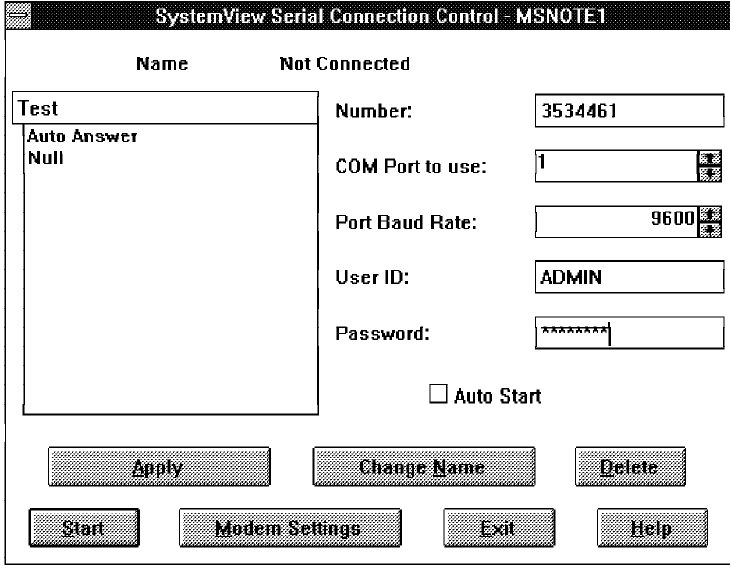
Figure 51. Serial Connection Control
The connection control is used to define all possible connection using the serial
link support of TME 10 NetFinity. In general we have two possibilities:
1. Running as a client, then defining a modem connection with Auto Answer.
2. Running as an active NetFinity Manager, then defining a modem connection
with a unique name.
•
Name
The name is used to identify the connection. Please specify a name that
might be logical to this connection, such as defining the name CHICAGO for
the connection to your outlet in Chicago.
Chapter 2. NT Systems Management Functions 37
File PDF · ·
Domande su Multitech MT1932ZDXI
Non ci sono ancora domande su questo manuale. Fate la prima.
Prodotti e manuali riguardanti Networking Multitech MT1932ZDXI
- Networking Multitech RF802EW Guida Utente
 (141 pagine)
- Networking Multitech MultiModem MTCBA-G-F4 Guida Utente
(43 pagine)
- Networking Multitech FF830 Guida Utente
(115 pagine)
- Networking Multitech MultiConnect Adapter Guida Utente
(20 pagine)
- Networking Multitech RF310E Guida Utente
(199 pagine)
- Networking Multitech BL-Series Specifiche
(126 pagine)
- Networking Multitech RouteFinder RF850 Guida Utente
(190 pagine)
- Networking Multitech RouteFinder RF550VPN Manuale Utente
(24 pagine)
- Networking Multitech FR111A Guida Utente
(66 pagine)
- Networking Multitech MTCBA-C-U Specifiche
(197 pagine)
- Networking Multitech FaxFinder FF840 Manuale Utente
(29 pagine)
- Networking Multitech MultiModem MTCBA-G-F4 Specifiche
(8 pagine)
- Networking Multitech ZDX Series Guida Utente
 (10 pagine)
- Networking Multitech MULTIVOIP MVP-410 Manuale Utente
(4 pagine)
- Networking Multitech FaxFinder FF840 Specifiche
(116 pagine)
- Networking Multitech MultiVOIP 400 MVP400 Guida Utente
(48 pagine)
- Networking Multitech CF220 Guida Utente
(12 pagine)
- Networking Multitech MTCBA-G-UF1 Specifiche
(40 pagine)
- Networking Multitech MT5600SMI Manuale Utente
(4 pagine)
- Networking Multitech MVP200 Guida Utente
(91 pagine)