Multitech MTPSR2-201 Guida Utente Pagina 82: Introduction
 1
 2
 3
 4
 5
 6
 7
 8
 9
 10
 11
 12
 13
 14
 15
 16
 17
 18
 19
 20
 21
 22
 23
 24
 25
 26
 27
 28
 29
 30
 31
 32
 33
 34
 35
 36
 37
 38
 39
 40
 41
 42
 43
 44
 45
 46
 47
 48
 49
 50
 51
 52
 53
 54
 55
 56
 57
 58
 59
 60
 61
 62
 63
 64
 65
 66
 67
 68
 69
 70
 71
 72
 73
 74
 75
 76
 77
 78
 79
 80
 81
 82
 83
 84
 85
 86
 87
 88
 89
 90
 91
 92
 93
 94
 95
 96
 97
 98
 99
 100
 101
 102
 103
 104
 105
 106
 107
 108
 109
 110
 111
 112
 113
 114
 115
 116
 117
 118
 119
 120
 121
 122
 123
 124
 125
82
MTPSR2-201
DSU ProxyServer User Guide
Introduction
This chapter provides procedures for viewing or changing the configuration of a remote unit.
Remote configuration requires the ProxyServer software to be loaded on the local PC. The local PC
then controls the remote ProxyServer via the LAN.
Remote Configuration
Remote configuration is LAN-based and requires a Windows Sockets compliant TCP/IP stack. TCP/
IP protocol software that must be installed and functional before the configuration program can be
used.
1.
You must assign an Internet (IP) address for the PC and for each node that will be
managed by the configuration program. Refer to the protocol software documentation for
instructions on how to set the IP addresses.
Once you have completed this step, you should be able to use the protocol Ping
command for the PC host name. You should also test the network interface configuration
by Pinging another TCP/IP device that is connected to the network.
2.
Install the ProxyServer software on the local PC. Once installed click
Start | Programs |
ProxyServer 2.10 | Configuration Port Setup
.
3.
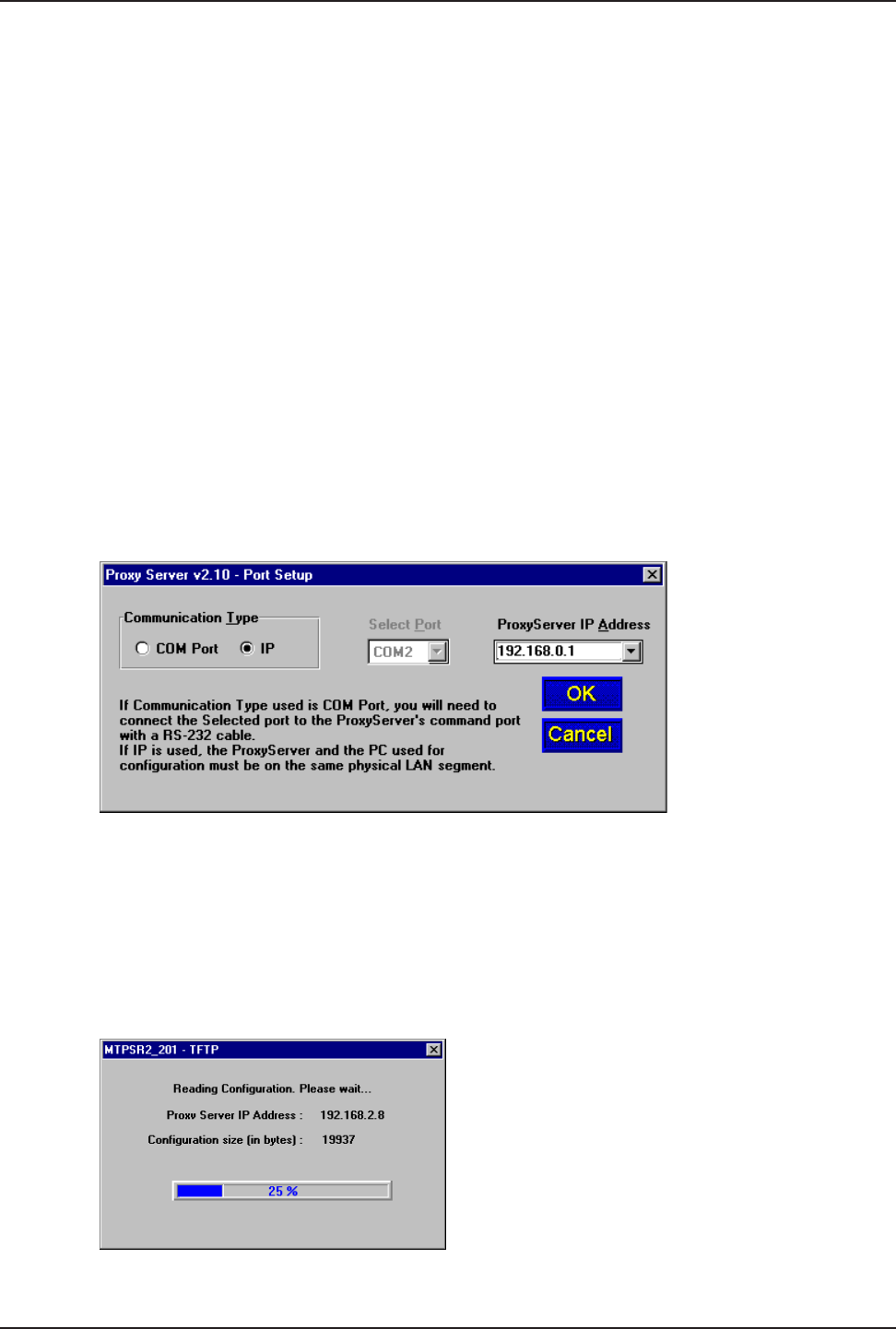
The ProxyServer
Port Setup
dialog box is displayed.
Verify that the
Communication Type
field is set to
IP.
In the
ProxyServer IP Address
field, enter the IP Address of the remote ProxyServer.
Click
OK
when you are satisfied with your selections.
4.
The windows Program Manager menu is displayed.
Double-click the
ProxyServer Configuration
icon.
5.
The
Reading Configuration. Please wait ...
screen is displayed.
File PDF · ·
Domande su Multitech MTPSR2-201
Non ci sono ancora domande su questo manuale. Fate la prima.
Prodotti e manuali riguardanti Networking Multitech MTPSR2-201
- Networking Multitech RouteFinder RF850 Manuale Utente
 (18 pagine)
- Networking Multitech FF100 Manuale Utente
(14 pagine)
- Networking Multitech MT64DSU Manuale del Proprietario
(66 pagine)
- Networking Multitech FF110 Manuale Utente
(17 pagine)
- Networking Multitech FF110 Guida Utente
(52 pagine)
- Networking Multitech RF102S Guida Utente
(26 pagine)
- Networking Multitech MT1932ZDXI Informazioni Techniche
(196 pagine)
- Networking Multitech RF802EW Guida Utente
(141 pagine)
- Networking Multitech MultiModem MTCBA-G-F4 Guida Utente
(43 pagine)
- Networking Multitech FF830 Guida Utente
(115 pagine)
- Networking Multitech MultiConnect Adapter Guida Utente
(20 pagine)
- Networking Multitech RF310E Guida Utente
(199 pagine)
- Networking Multitech BL-Series Specifiche
(126 pagine)
- Networking Multitech RouteFinder RF850 Guida Utente
(190 pagine)
- Networking Multitech RouteFinder RF550VPN Manuale Utente
(24 pagine)
- Networking Multitech FR111A Guida Utente
(66 pagine)
- Networking Multitech MTCBA-C-U Specifiche
(197 pagine)
- Networking Multitech FaxFinder FF840 Manuale Utente
(29 pagine)
- Networking Multitech MultiModem MTCBA-G-F4 Specifiche
(8 pagine)
- Networking Multitech ZDX Series Guida Utente
 (10 pagine)